
~/.claude/.claude-manager/statusline.json
Track Claude Code usage and your limits
How many tokens went where — by model, by project, by tool — and how much of your 5-hour and weekly allowance is left, right in the VS Code status bar. Worked out from files already on your disk.
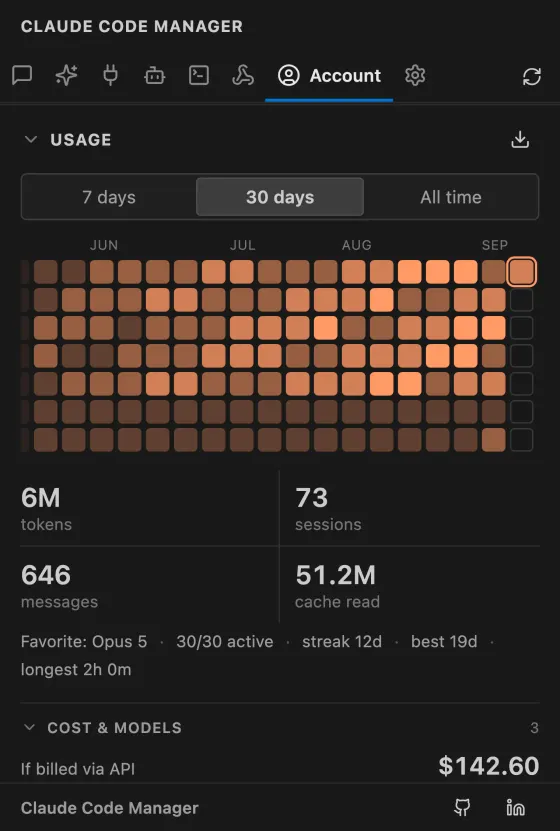
Account tab → Usage
See where your Claude Code tokens go
Claude Code records token counts for every message in its session files. The Usage view adds them up for the last 7 days, 30 days or all time, and splits them four ways, so a busy week has an explanation.
- By model — how much went to each Claude model, with cache-hit rates.
- By project — which repositories used the most.
- By tool and MCP server — which tools Claude reached for, and how often.
- Activity heatmap — when you used Claude Code, day by day.
A cost figure shows what those tokens would cost at public API rates, from a price table in the extension. It's a yardstick, not a bill: Pro and Max plans are a flat price.
rate_limits.five_hour · rate_limits.seven_day
Your 5-hour and weekly limits, in the status bar
Claude Code already knows how much of your plan's limits you've used: it hands that to its statusline command as rate_limits. Switch on the Quota card and a small tap saves that data to a local file; the extension reads the file. You get both windows as bars, reset times, your weekly pace, and a status bar item that turns amber from 75% and red from 90%.
Nothing is fetched. The numbers are as fresh as Claude Code's last statusline update, and the card shows when that was. Claude Code includes limit data for Pro and Max subscribers after the first reply in a session — see how the limits work.
Example values. Status bar reads 5h 72% · 7d 40%.
Turn on the Quota card
- Open the Account tab and choose to enable the Quota card (the extension also offers this once on its own).
- It adds one
statusLine.commandentry to~/.claude/settings.json. If you already had a statusline, it keeps running — the tap passes the data on to it. - Send one message in Claude Code. The card and the status bar fill in.
Turn it off and the entry is removed.
FAQ
Questions, answered
How do I see my Claude Code usage in VS Code?
Open the Account tab. Usage shows tokens, sessions and cache reads for the last 7 days, 30 days or all time, broken down by model, project, tool and MCP server. Turn on the Quota card to see your 5-hour and weekly limits too.
Where do the 5-hour and weekly numbers come from?
From Claude Code itself. Claude Code passes rate_limits to its statusline command; the opt-in tap saves that to a local file, and the extension reads the file. It never calls Anthropic and never uses your token. The figures are as fresh as Claude Code's last update, and the card says when that was.
Why doesn't the Quota card show anything yet?
It needs two things: the statusline tap switched on, and at least one Claude Code reply after that. Claude Code only includes limit data for Pro and Max subscribers (or behind a gateway with a spend limit), after the first response in a session.
Is the cost figure my bill?
No. It is what those tokens would cost at public API rates, from a price table in the extension. Pro and Max subscriptions are billed at a flat price.
What changes on my machine when I turn the Quota card on?
One entry: statusLine.command in ~/.claude/settings.json, pointing at the tap. Your existing statusline still runs — the tap passes the data on to it. Turning the card off removes the entry.
Free, open source, and it stays on your machine.
Apache-2.0. No telemetry, no account, no network client. Works with the Claude Code CLI and the official extension.
code --install-extension vishalguptax.claude-manager